|
What is new in Condes 10.2
|   |
|
What is new in Condes 10.2
| |
Condes 10.2 introduces improvements to existing features.
Relay Teams Allocations
Condes helps compose relay teams by automatically assigning course variations to team member. This is done in a spreadsheet like window. Each team is assigned a set of course variations, one for each relay leg, and you can export the teams to an event administration system and print out personal maps for each competitor.
Condes 10.2 enhances and simplifies the use of the auto-assign feature, so that all possible combinations of course variations can be used.
|
Transparent backgrounds Condes 10.2 introduces support for transparent backgrounds for text objects, mask objects, and graphics objects. The transparency of the background can be configured via a new setting in the configuration dialog for the object. One end of the scale is 100 % opaque (solid background color), and the other end of the scale is 100 % transparent (similar to invisible background color). Note that PostScript does not support transparent colors, so backgrounds will be solid when printed on a PostScript printer or exported to EPS. PDF supports transparency, so the recommendation is to export to PDF and print the PDF file. |
Mask object with transparent color |
Text object with transparent background |
Course Dialog Window
|
This window has been reorganized to improve user friendliness. New tabs have been added, so that advanced settings are placed on separate tabs and the dialog has become less "busy". Basic settings are visible when you open the dialog window. |
|
Course: Co-located start and finish
Instead of having to create separately a start and a finish point, a course can now be configured to use the start point also as finish, so that you don’t need to explicitly create a finish point. Finish circles will be drawn on top of the start triangle.
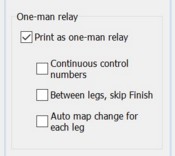
Course: One Man Relay printing
|
|
In a one-man relay, all relay legs are run by the same competitor. This is very similar to a normal course with loops. However, a relay course with forks provide more control over which branches are used in what order, so in some cases it may be suitable to use a relay course, printed as a one-man relay Prior to version 10.2, it is possible to export to XML relay team combinations as one-man courses. Version 10.2 introduces support for printing and exporting Relay courses as One-Man Relays. Continuous numbering of controls instead of numbers restarting for each leg, and an option to skip from last control directly to the start point, omitting the finish point, between relay legs. |
Course: Discipline and Format
Condes 10.2 allows removes the restriction that only one discipline (Foot orienteering, MTB orienteering, Ski orienteering, Trail Orienteering) can be used in one event file. The event file still has a main discipline, but a course can be configured for a different discipline. This allows for example Trail orienteering courses in the same event as Foot orienteering courses.
Trail Orienteering: Controls
Basically, all controls can now be used on trail orienteering courses. A tab has been added to the Control dislog, so that Trail-O specific settings are gathered in one place. A new setting allows you to enter the correct answer for each control. This data is included in the controls spreadsheet.