|
Loops
|   |
|
Loops
| |
Loops are commonly used when you want to spread runners, to avoid following, for example if you have a mass start.
Condes supports "butterfly" and "diamond" loops.
To create a course with loops, first create a normal course, then add the loops to the course.
Adding a loop is done in the Course window, which you can open from the Course Layout Editor by using the menu Course / Edit, or by simply double-clicking on the map.
In the Course Layout Editor, you can choose to show either of the course variations created by the loop(s). In the printout window, you can select the variations to print.
You can mix butterflies and diamonds on the same course. Adding multiple butterflies or diamonds to the same course creates additional variations.
You cannot add loops to a relay course.
Butterfly loops
|
|
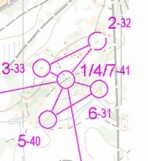
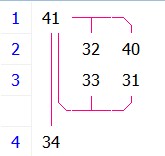
A butterfly uses a common control and 2-6 loops of controls. Competitors run the loops in different order, coming back to the common control after each loop. The course shown at the left has a butterfly common control 41, and two loops 32-33 and 40-31. This generates two variations: AB, and BA, where AB takes controls in the order -41-32-33-41-40-31-41-, and BA takes the loops in the opposite order, so -41-40-31-41-32-33-41-. |
Diamond loops (Phi loops)
|
|
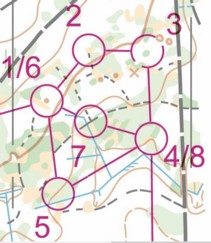
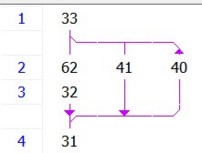
A diamond uses two common controls: an entry and an exit control, and 3 branches: 2 branches from the entry control to the exit control, and one branch back. Competitors start with the entry control, and take the two "forward" branches in different order, going to the exit control, and using the "backwards" branch back to the entry control. The course shown at the left has a diamond with entry control 33 and exit control 31. This generates two variations: AB, and BA, where AB takes controls in the order -33-62-32-31-40-33-41-31-, and BA takes the loops in the opposite order, so -33-41-31-40-33-62-32-31-. |