|
How to automatically cut course leg lines
|   |
|
How to automatically cut course leg lines
| |
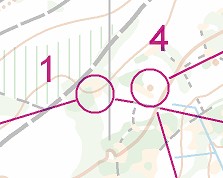
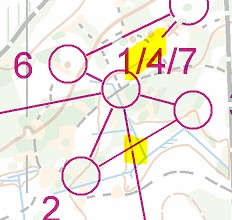
A course leg line may cross other course objects, such as a control circle, a control number, or another course leg line.
Condes automatically cuts a gap the line when this happens, to avoid obscuring important details.
If you want to change the size of the standard gap, or you want to disable this feature, you can use the menu Canvas / Course Overprint Symbols and Dimensions. On the Additional Dimensions and Fonts tab, you find the relevant settings.